In Night Shift you work a warehouse after dark: a crane drops crates, you push them into place, and every full bottom row ships out for points. This page shows how to play this block puzzle, every rule on a real screen of the game; the guides below go deeper.
The goal
Fill the bottom row. A crane at the top of the screen keeps dropping crates into eight columns. When every column holds at least one crate, the bottom row ships out and scores points, and everything above it sinks one row. Ship enough rows and the shift is signed off with a bonus; then the next shift starts, a little faster than the last.
The game ends in one of two ways: a column grows ten crates high, or a crate lands on your head when you have no helmet left.
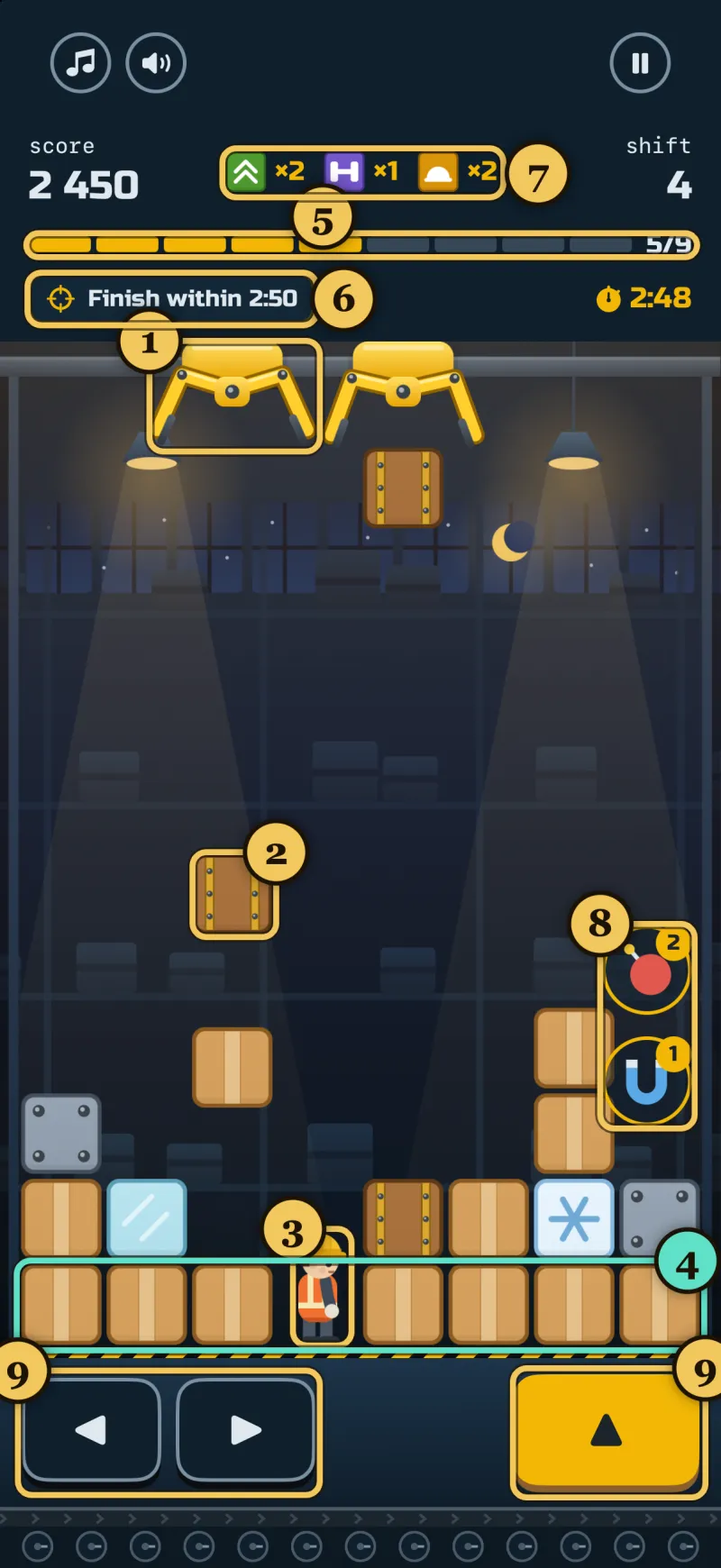
- The cranes carry a crate across and drop it into a column. The second crane joins from shift 3.
- A falling crate. Do not stand under it.
- You, the worker. Without a helmet, one crate on the head ends the game.
- The bottom row: seven cells are full and the worker stands in the eighth. When it fills, the row ships.
- The shift's progress: one block for every row you must ship.
- The shift's task: an optional goal that makes the shift bonus half as big again.
- Your upgrades: jump level, strength level and helmets.
- The bomb and the magnet keys, with the number you hold.
- The arrow keys and the jump key.
Controls
Arrows: hold one to walk; a short tap moves you exactly one cell. Walk into a crate standing at your feet and you push it one column along. Jump: tap it to climb onto a crate; hold it for the full height your jump level allows, and let go early for a lower jump (never lower than one crate). Walk into a crate that is still falling and you knock it into the next column.
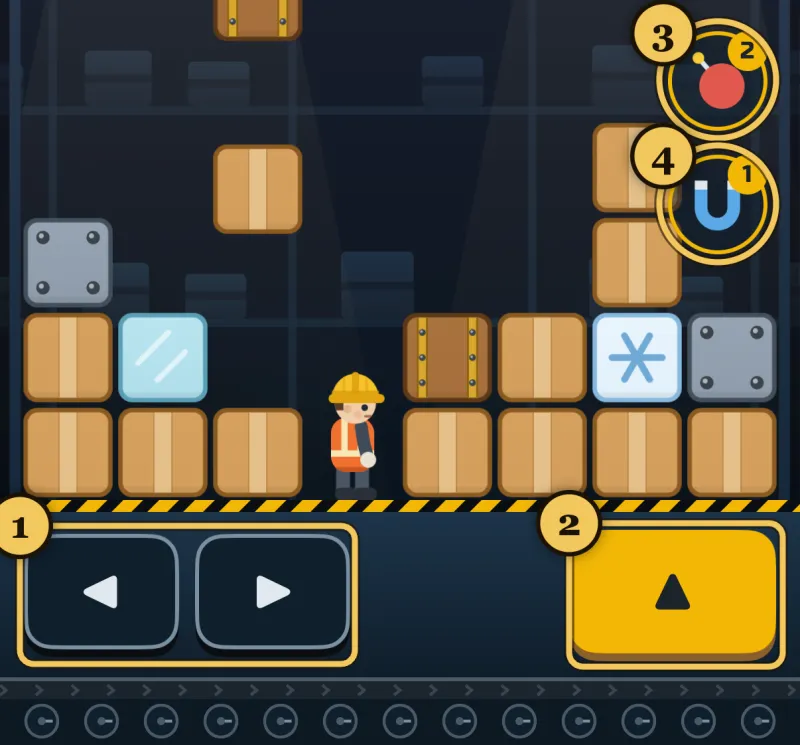
- Left and right arrows.
- The jump key.
- The bomb key. The number is how many bombs you have.
- The magnet key. The number is how many magnets you have.
A stack one crate high is a step you can push or climb. Two crates high is a wall until you jump up (see upgrades for higher jumps). The pause button is at the top right; the music and sound switches at the top left. The game is saved whenever you pause, so you can leave and carry on later.
Shipping rows
A row ships the moment every one of the eight columns has a crate on the floor. It does not matter how tall the columns are or what the crates are made of. The crates on the floor vanish, the stacks drop one row, and you score 100 points, more if you are quick (see scoring).
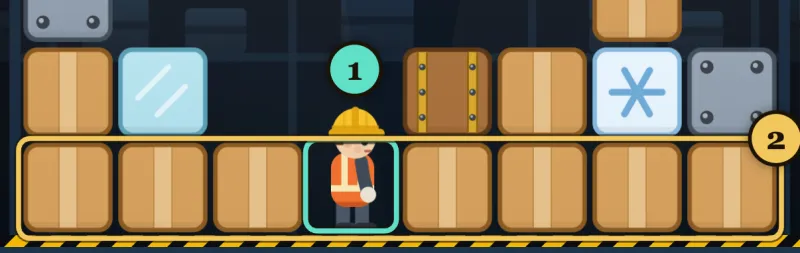
- The one empty cell of the bottom row.
- The seven filled cells. Together with a crate in the gap they make a full row.
How many rows a shift needs grows with the nights: eight rows for shifts 1 to 3, then one more for every three shifts, up to sixteen. Shifts and tasks has the table.
The helmet
You start every game with one helmet. A crate that lands on you takes the hat instead of ending the game, and it also takes your jump and strength upgrades (bombs and magnets stay). With no hat left, the next hit is the end. A crate that only grazes the edge of your body shoves you aside and does no harm. You can hold up to three helmets; more come down from the crane as rare yellow crates, and you can bring spare ones in from the shop.
The crates
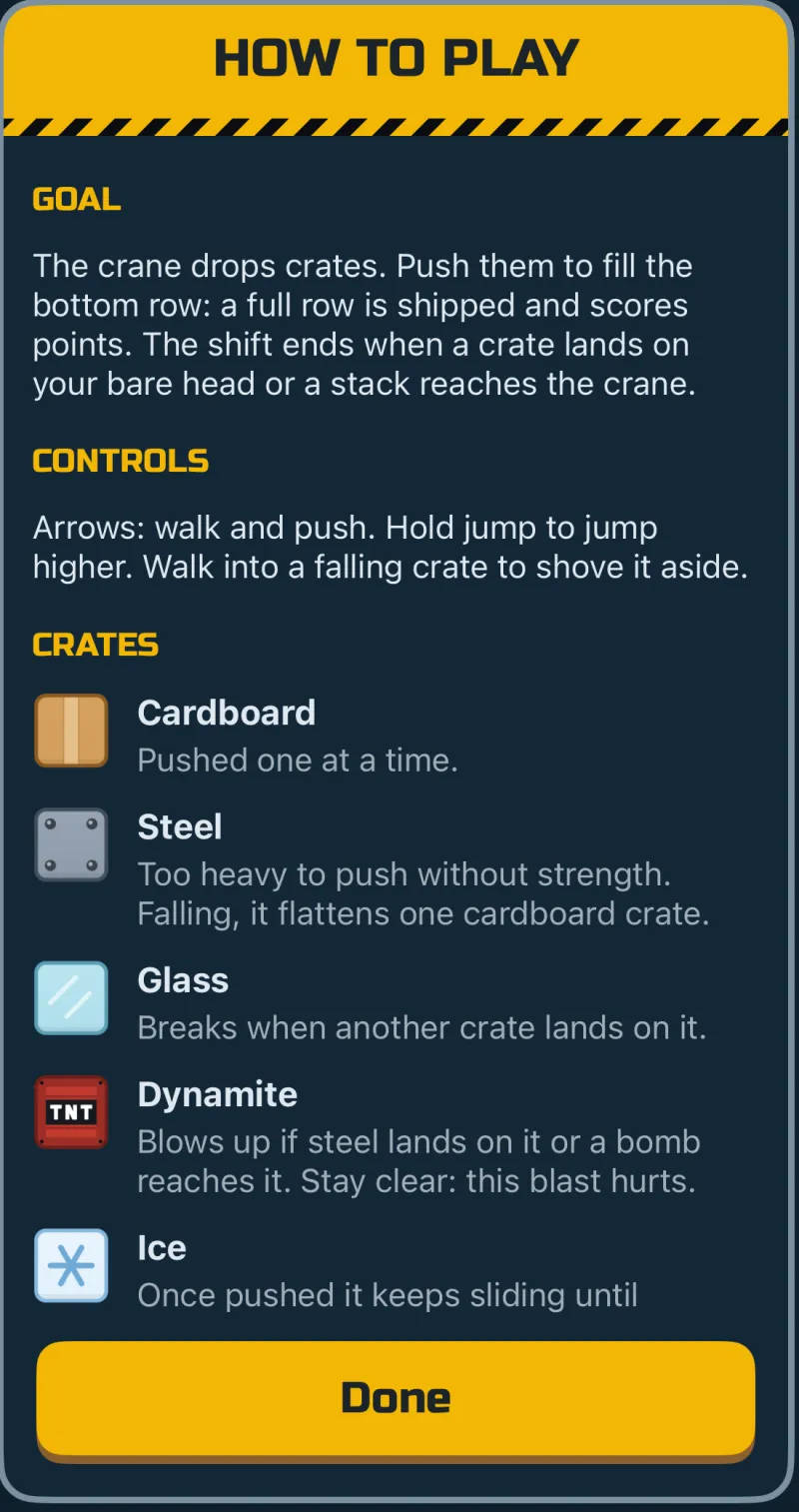
Six kinds of crate fall from the crane, and each behaves in its own way. Cardboard is pushed one at a time. Steel is too heavy to push without strength and flattens cardboard when it lands. Glass breaks when another crate lands on it. Dynamite goes off when steel lands on it or a bomb reaches it. Ice keeps sliding once pushed. Valuable cargo pays 300 points when shipped.

- Cardboard.
- Steel.
- Glass.
- Dynamite.
- Ice.
- Valuable cargo.
- Helmet (a pickup).
- Magnet (a pickup).
Every crate, with how to handle it, is in the crates guide.
The upgrades
Yellow, green, purple, red and blue crates are pickups: touch one and it is yours, falling or standing. A helmet saves you from one hit. Jump lets you leap up to three crates high. Strength lets you push steel, and then two light crates at once. A bomb clears the crates around you. A magnet pulls a crate towards you. They are rare: at least six ordinary crates fall between two pickups. The upgrades guide explains each one.
Shifts and tasks
The first shift of a game is a regular one. Every later shift has a twist: steel, a dark warehouse, a rush, extra dynamite or a generous one. From shift 2 the lights fail now and then, and a second crane joins partway through the shift, earlier as the nights go on. Each shift also sets a task, such as finishing without a hit. Do it and the shift bonus is half as big again.
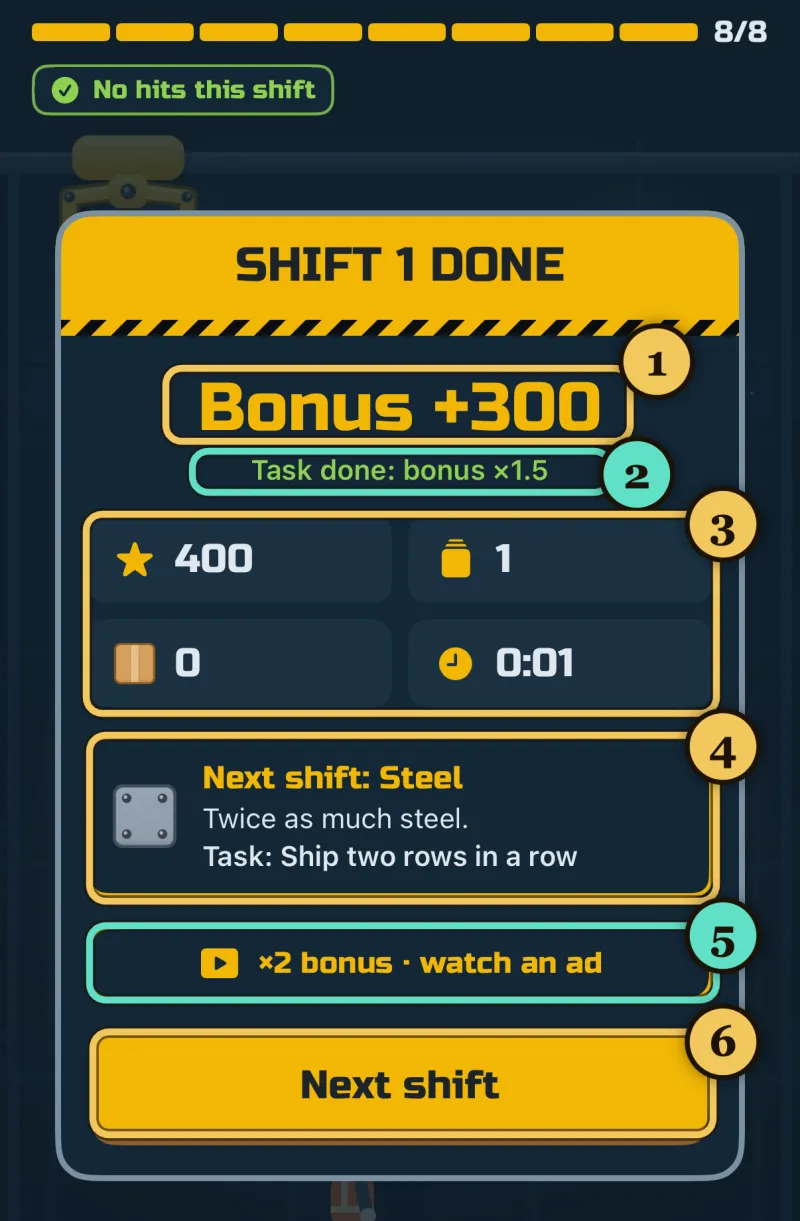
- The shift bonus.
- Whether the task was met: the bonus is multiplied by 1.5 when it was.
- Your score, the rows you shipped, the crates dropped and the time of the shift.
- What the next shift will be like and its task, so you can get ready.
- An optional ad that adds the bonus once more.
- Start the next shift. A short 3-2-1 count-in gives you a moment first.
Shifts and tasks lists every kind and every task.
When the game ends
A lost game can be picked up again with a helmet on. The button says Continue with a helmet. It costs coins or a short ad, the stacks are cut down to four crates, and your score and shift carry on. Not in the daily challenge, where everyone plays under the same conditions.
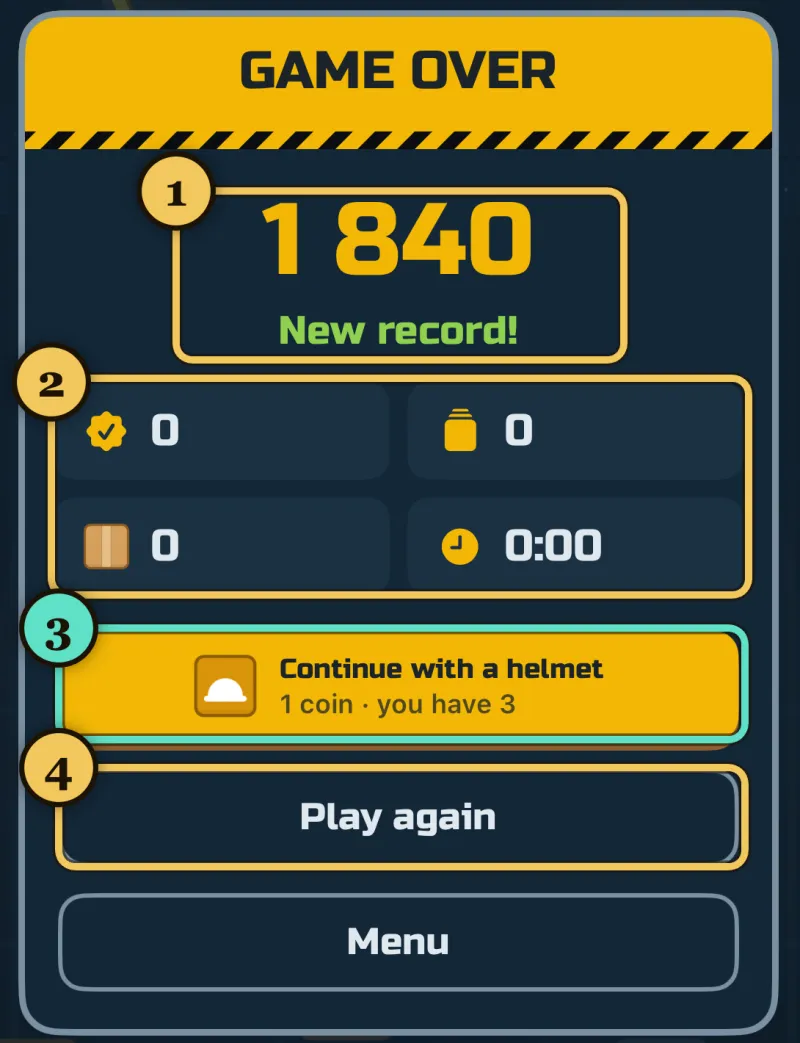
- Your score, and whether it is a record.
- Shifts finished, rows shipped, crates dropped and time played.
- Continue with a helmet. The line under it says what it costs.
- Start a fresh game.
The price of each continue, the free coin of the day and the supply crates are in revive and coins.
The daily challenge
Once a day the game offers a challenge with the same dice for everyone: the same run of crates, shifts and tasks, always from shift 1, with a leaderboard of its own. Play it on consecutive days for a streak, and every seventh day in a row pays one coin. The daily challenge guide has the details.
The menu
The title screen has everything: Start (or Continue, when a game is put away), the daily challenge, and a row of round keys.
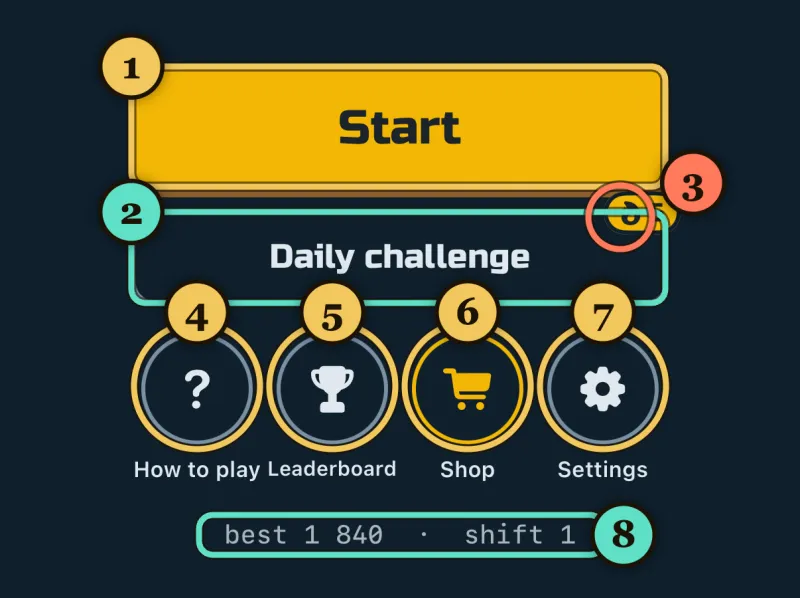
- Start a new game. With a game put away, this button says Continue.
- The daily challenge.
- The streak: days in a row.
- The game's own rules screen.
- The leaderboard (Game Center on iPhone and iPad).
- The shop.
- The settings.
- Your best score and the shift a new game starts from.
In the settings you can choose the shift a new game starts from (1 to 5), switch the music, sounds and vibration, change the language and turn the daily reminder on or off.
Every guide
- CratesEvery crate type: what it does and how to handle it.
- UpgradesHelmet, jump, strength, bomb and magnet: what each does and when to use it.
- Shifts and tasksShift length, special rules, tasks and bonuses, and how the pace grows.
- ScoringPoints for rows, combos, valuable cargo and the shift bonus.
- Daily challengeThe same crates for everyone, the streak and its weekly coin, the reminder.
- Revive and coinsWhat continuing costs, where coins come from, the free coin and the supply crates.
- Tips and strategyPractical strategy for rows, crates, upgrades and late shifts.
- AchievementsThe 15 achievements, and the two leaderboards.
- FAQPrice, ads, offline play, platforms, privacy, purchases and progress.