Night Shift is also a daily challenge game: once a day, and as often as you like, it offers a challenge played with the same dice for everyone: the same run of crates, the same kinds of shift and the same tasks. Play it on consecutive days and your streak grows; every seventh day in a row pays a coin.
What is different
Open the challenge with the Daily challenge button under Start. The game seeds its dice from the date, so everyone who plays on the same date gets the same run of crates, the same kinds of shift and the same tasks. What you do with them is up to you. A challenge always starts from shift 1, whatever starting shift you set.
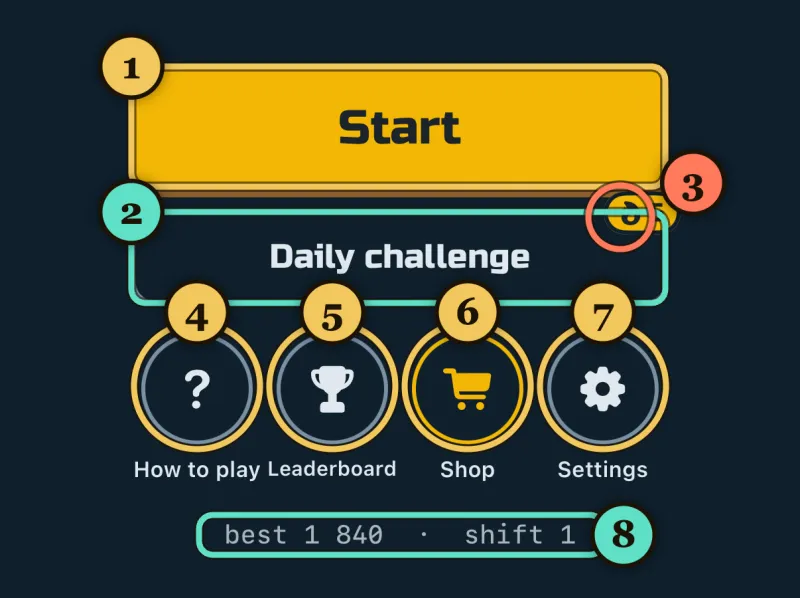
- Start a normal game.
- The daily challenge. After you have played, your best score of the day shows next to its name.
- Your streak: days in a row.
- How to play.
- The leaderboard.
- The shop.
- The settings.
- Your best score and starting shift for normal games.
To keep it fair, a few things are switched off in the daily challenge:
- bought supplies are not used (helmets, bombs and magnets from the shop);
- there is no continue after a game over;
- there is no ×2 bonus ad between shifts.
Upgrades that fall from the crane work as usual. The challenge keeps its own best score for the day and has a leaderboard of its own that starts afresh every day, next to the all-time one (Game Center on iPhone and iPad, Google Play Games on Android). It does not touch your normal record. Left unfinished, a challenge is saved, and starting it again the same day picks it up where you left it.
The streak
Finishing a daily challenge, that is, playing it to its game-over, counts for the day. Only the first one of each calendar day counts for the streak, however many times you play. If the last counted day was yesterday, the streak goes up by one; after any longer gap it starts again at one. The flame on the button shows the streak while it is alive, which is when the last counted day is today or yesterday.
The weekly coin
Every seventh day of a streak (7, 14, 21 and so on) pays one coin. The game-over board says so: "A week in a row: +1 coin". The coin is what you use to continue a lost game.
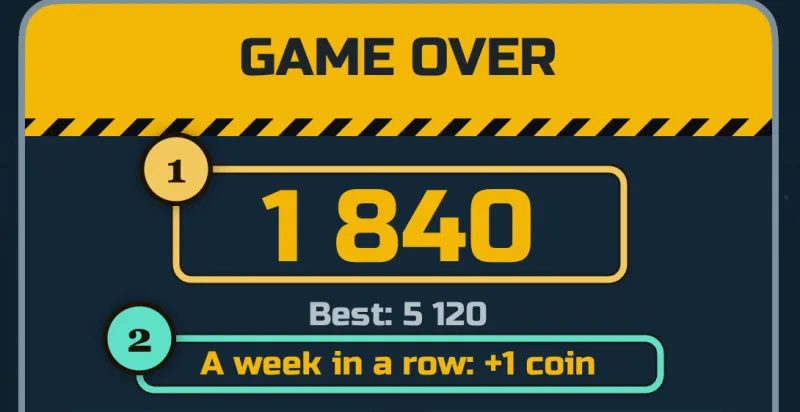
- Your score.
- The weekly coin.
The reminder
After you finish your first daily challenge, the game asks once whether you want a reminder. If you say yes, it sends one notification at 19:00 your time on each of the next seven days, reading "Today's challenge is waiting for you." It skips today when you have already finished today's challenge, and the schedule is renewed whenever you open the game or finish a challenge.
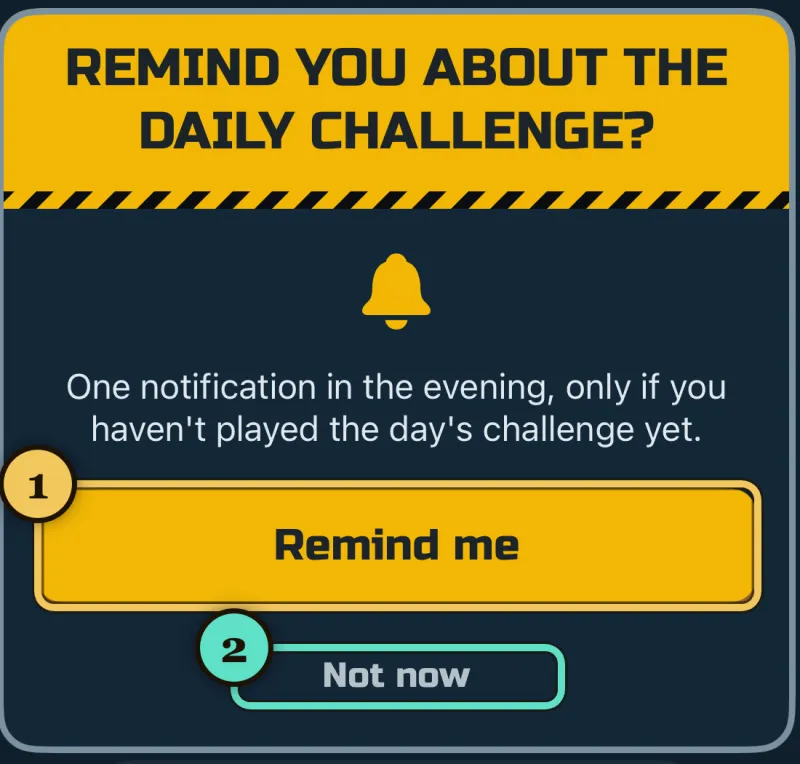
- Turn the reminder on. The system asks for permission to send notifications.
- Say no for now.
You can change your mind at any time: open the settings from the title screen and use the Daily reminder switch. Switching it off cancels the pending reminders. You can also turn notifications off in your phone's own settings.
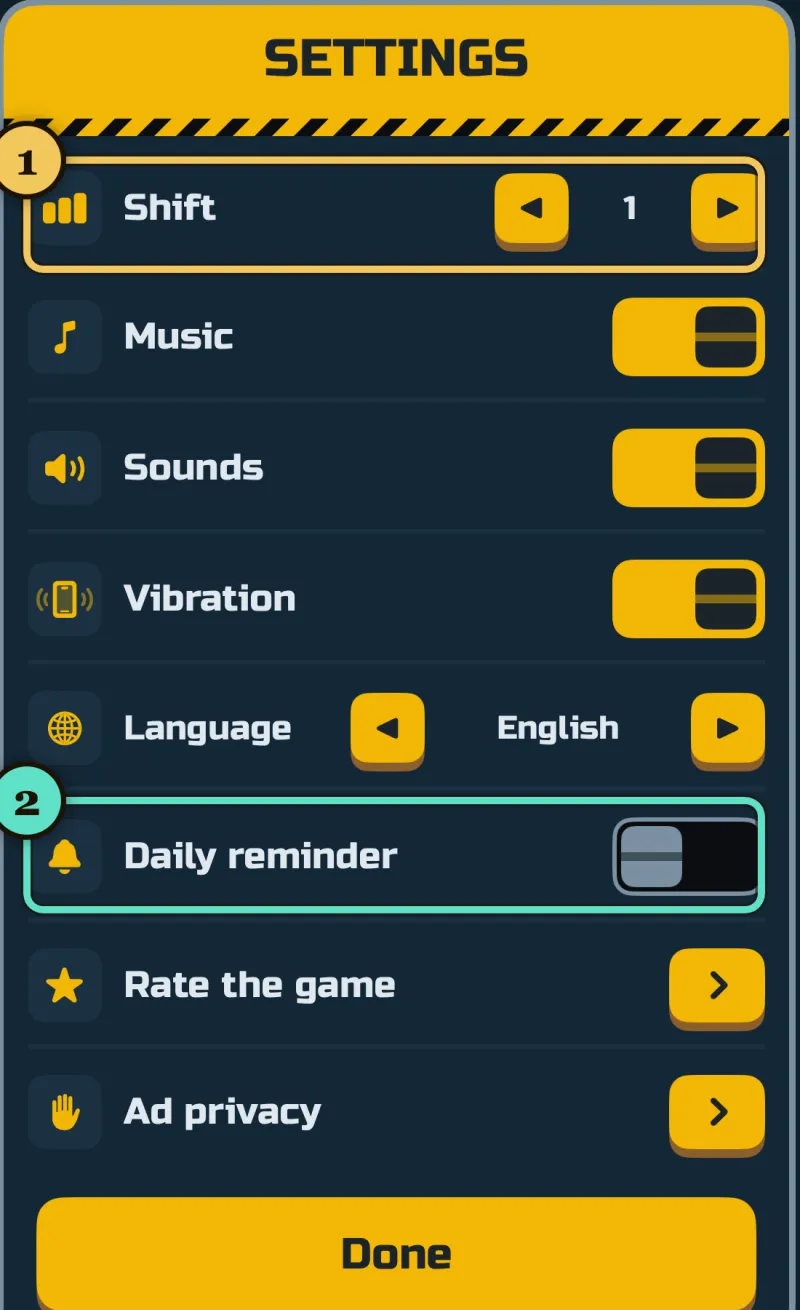
- The shift a new game starts from, 1 to 5.
- The daily reminder switch.
Tips for the daily challenge
- Everyone has the same dice, so the board is the same kind of problem for everyone: the difference between players is how well they solve it. Look at the next shift's task on the card and plan for it.
- You cannot rely on shop supplies here, so keep the helmets the crane drops.
- A game you play to the end counts for the streak even if it is short. Do not skip a day because you are short of time.
Two achievements are for it: "Daily Shift" for playing a challenge to the end once, and "Full Week" for seven of them in total.