One-handed games are games you can play while the other hand holds a rail, a bag, a coffee or a child. The label is loose and many store pages use it without meaning it, so this page explains what really makes a game playable with one hand, why people look for it, and how to check a listing before you install. Night Shift is used as an honest example of a game that is not one-handed.
What makes a game one-handed
A one-handed game needs only one thumb or finger to do everything that matters, from the first screen to the last. That sounds simple, but a game fails the test the moment it asks for two inputs at once. Look for these qualities.
- Few controls. One tap, one swipe or one slider. Every extra button is a place your other hand has to go.
- No precise aiming. Dragging a tiny target across the screen takes two hands for steadiness, or a lot of patience.
- Reachable layout. Controls should sit where the thumb of the holding hand can reach. On a big phone that means the lower half and a side, not the top corners.
- Turn-based or self-paced. If nothing happens until you act, a one-handed pause is harmless. Real-time games punish a slipped grip.
- Pause-friendly. You will be interrupted: a bag moves, a bus stops. The game should keep your place.
Why people look for them
The searches come from a few very different situations, and the right game depends on which one is yours.
- Commuting. One hand on a pole or strap, one hand on the phone. See games to play on the bus for the rest of that list.
- Carrying or holding something. A baby, a drink, shopping, a pet lead.
- Accessibility. Some players have one working hand, limited grip or a condition that makes two-handed play tiring. For them it is a need, not a convenience, and the details matter far more than a label does.
- Lying down or relaxing. A phone held above your face in bed is tiring with two hands.
If accessibility is your reason, treat everything here as a starting point. Store pages cannot tell you how a game feels in your hand, so test it, and check your phone's own accessibility settings too, since they can add alternative touch controls to any app.
Genres that usually work, and genres that usually do not
| Usually works | Why | Usually does not | Why |
|---|---|---|---|
| Card and solitaire games | Tap to select, nothing is timed | Twin-stick shooters | Two thumbs, two jobs |
| Turn-based puzzles | You choose the pace | Fast rhythm games | Many fingers, strict timing |
| Idle and clicker games | One tap does it all | Racing with tilt and buttons | Steering and pedals together |
| Word games and quizzes | Tap letters or answers | Platformers with a pad and a jump key | Move and jump at once |
How to check a listing before you install
- Read the screenshots for the controls. Look for buttons at both bottom corners. That is the picture of a two-thumb game.
- Search the description for the words tap, swipe and drag. A single verb is a good sign.
- Read the lowest reviews that mention hands, thumbs or grip. Recent players will tell you what the screenshots hide.
- Check whether it is real-time. If nothing waits for you, one-handed play is easier.
- Try the first level standing up. Hold the phone the way you will actually hold it, on a train, in a queue, while carrying something.
Do not trust a title that says "one hand" and a layout that shows two clusters of buttons. And remember that a game being playable with one hand in a calm moment is different from being comfortable in a moving bus.
An honest example: Night Shift is a two-thumb game
Night Shift is a good test of the checklist, because it shows the pattern. A crane drops crates into eight columns; you walk, jump and push crates, and a full bottom row ships for points. In real time, those actions need two inputs.
The direction keys sit on the left of the strip under the field, and the jump key sits on the right. You can hold an arrow to walk while you tap jump, and a hit or a gap often needs both within a second. The bomb and magnet keys sit on the right edge of the field. On a phone, this is comfortable with two thumbs and awkward with one. A player who holds the phone in one hand and uses the other thumb for everything can still play, but it is slower, and the game does speed up from shift to shift.
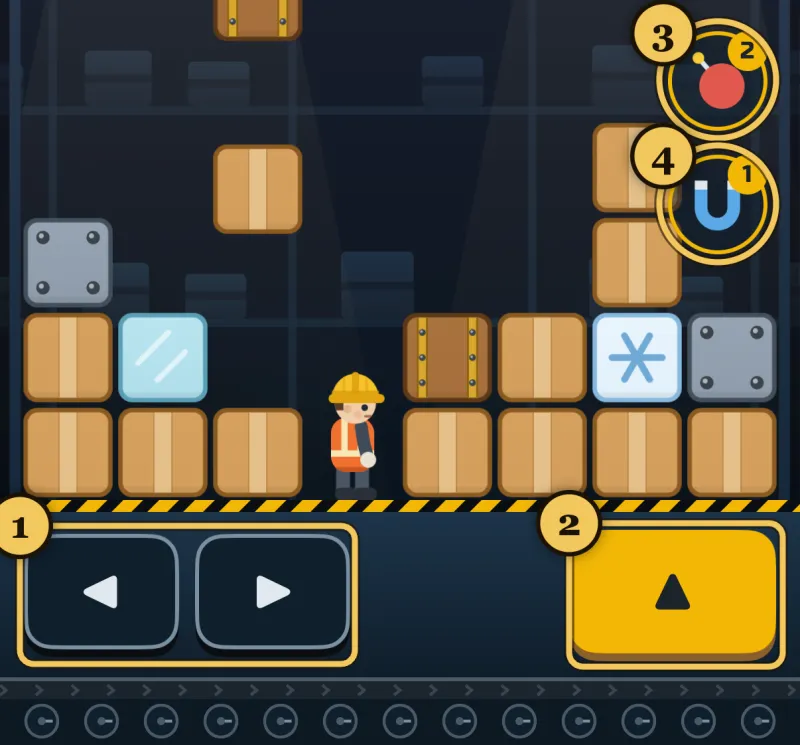
What does help one-handed players in Night Shift: the game is saved when you pause or leave, so an interruption costs nothing; it plays offline; and there is no countdown that ends the game, only the crane's pace. There is no one-handed mode, and I would not call it a one-handed game. If that is what you need, a turn-based puzzle is the safer pick. The page on how to play shows the controls in detail if you want to judge for yourself.
Other ways to make any game easier one-handed
- Use a phone grip or ring so your thumb can reach farther without a shaky hold.
- Switch to one-handed keyboard or reachability modes, which pull the top of the screen down.
- Turn on assistive touch options in your phone's accessibility settings.
- Pick the smaller phone for the commute and the larger one for the sofa.
- Pause often. A game that saves when you leave is a game you can play in short pieces.
Can I play Night Shift with one hand?
It is built for two thumbs: arrows on the left, jump on the right. You can manage with one thumb, but it is slower, and it is not designed or promised as one-handed play.
Do one-handed games need to be offline?
No, but commuting and travel often mean weak signal, so a game that plays offline avoids loading screens. Night Shift plays offline; ads, the shop and leaderboards need a connection.
Are turn-based games always one-handed?
Usually, because nothing is timed and one tap per move is enough. Check the controls: some still need dragging or pinching.
To go on: the FAQ covers saving and offline play.