The best games to play on the bus are short, quiet and forgiving: you can start one in the time between two stops, stop when the doors open and come back to the same place. This page lists what to look for in a game for a bus, train or commute, including patchy signal and motion, and shows how Night Shift behaves on that test, honestly.
What a commute does to a game
A bus is the opposite of a quiet armchair. You are interrupted, jostled, short of space and often without a good signal. The games that work are the ones designed, or at least well suited, for that.
- Stop-and-go sessions. A journey is not one long block. It is a few minutes, a stop, a few minutes more. A game with rounds of two to five minutes fits; a game that needs thirty minutes to get anywhere does not.
- Signal dropouts. Tunnels, rural stretches and crowded cells all break connections. A game that needs a server to start will stop at the worst moment.
- Motion. Fine aiming is hard on a moving vehicle, and small text and quick eye work can cause queasiness for people who are prone to it.
- Sound off. Most people play in silence or with headphones that they may not have. A game must be understandable without audio.
- Interruption. Your stop arrives. The game should save without asking.
A checklist for a commute game
| Question | Good answer | Why it matters |
|---|---|---|
| Does it work offline? | Yes, completely | Tunnels, roaming and flight-mode trips |
| Does it save when you leave? | Automatically | Your stop will come at a random moment |
| Is a round short? | Two to five minutes | Matches the gaps between stops |
| Can you play without sound? | Yes | Many commuters have no headphones |
| Is the text readable at arm's length? | Yes | Moving vehicles make small text hard |
| Do ads stop the game? | Only if you choose them | A forced ad while you hold a pole is a nuisance |
Kinds of game that fit
- Card and solitaire games. Turn-based, silent and instantly resumable.
- Word and number puzzles. Self-paced, one tap per move, easy to put down. See one-handed games for more on reach.
- Short arcade rounds. A score-chasing game with rounds of a few minutes suits a short ride, if it is not a game that needs both thumbs for a precise jump on a bumpy road.
- Idle games. They need little input, but many push notifications and ads.
- Story and text games. Good if reading in motion does not bother you. For many people, it does.
The same list works for trains and flights, with a few changes. A flight asks the most from offline play, so see games on an airplane for that case, and the page on offline games for the whole question.
How Night Shift does on the bus test
Night Shift is an arcade stacking game: a crane drops crates into eight columns, you walk, jump and push them into place, and every full bottom row ships out for points. A shift is eight rows to start with, a bonus when you finish, and then a slightly faster next shift. Here is the honest result.
- Offline: yes. Every game, the daily challenge included, plays without a connection. Ads, the shop and the leaderboards need a network, but those are optional extras.
- Saving: yes. The game is saved whenever you pause or leave it. The Start button then reads Continue, and you carry on from the same place. The pause button is at the top right.
- Round length: moderate. The first shifts are brief, and you can stop between them or pause in the middle. A single game can last longer as the shifts go on, but pausing is always free.
- Sound off: yes. There are switches for music and sound at the top left. The game reads fine on the screen alone.
- One hand: no. It is a two-thumb game, with arrows on one side and jump on the other, so it suits a seat better than a strap. The page on one-handed games explains this.
- Motion: it depends. The pace is fast enough that a very bumpy road makes timing harder, though you can pause at any moment.
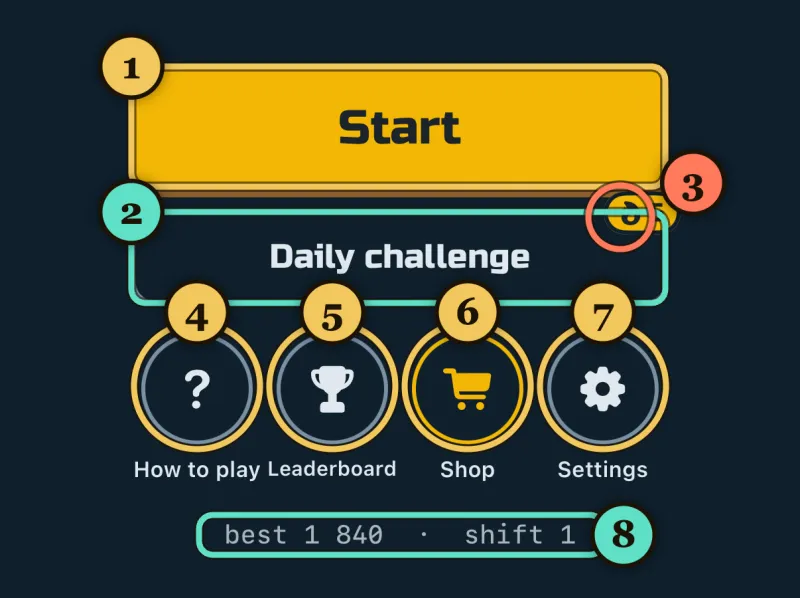
If you have a seat and both hands free, it is a good fit for a half-hour commute. If you are standing and holding on, choose something turn-based. The how to play page has the controls if you want to check before a trip.
Small habits that help
- Download before you leave. Do the update and the first launch on Wi-Fi, so the game does not need anything on the road.
- Charge, or lower the brightness. Games use more battery than reading.
- Turn off notifications you do not need. In Night Shift you can switch off the daily reminder in the settings.
- Pick a game for the stretch, not the whole journey. Read, look out of the window, or just rest when you want to.
- Pause before the stop. Even if the game saves, pausing means you never lose a shift by hurrying.
Can I play Night Shift on a bus without internet?
Yes. Games, including the daily challenge, play offline and save when you leave. Only ads, the shop and the leaderboards need a connection.
Can I play without sound?
Yes. The music and sound switches are at the top left of the game screen.
What if I get motion sick looking at a phone?
Pick games with large, simple visuals and take breaks. If it persists, look up from the screen and rest; no game is worth feeling ill.
For a related read on keeping your place, see the FAQ on saving.