The best iPad games are not simply the biggest or the most expensive: they are the ones that gain from a bigger screen. A tablet gives you more room to see, a steadier hold and, with a stand, the option of sitting back, and different kinds of games benefit from each. Here is what the extra size changes, which kinds of game profit, and how to find free and offline options that suit an iPad.
What a bigger screen changes
Moving a game from a phone to an iPad changes four things, and each one matters for a different kind of game.
- Room. More of the board or map is visible at once, so you plan further ahead with less scrolling or zooming.
- Touch targets. Buttons can be larger and further apart, which helps games with many controls.
- Posture. A tablet often sits on a table or a stand rather than in one hand, so games can ask for two hands or longer sessions.
- Sharing. A big screen is easy for two people to look at together.
Not every game gains. A one-button timing game looks much the same on any screen. A strategy game with a big map, a drawing app or a game with a detailed field changes a lot.
Which kinds of game gain
| Kind of game | What the iPad adds | Good for |
|---|---|---|
| Puzzle and logic | See the whole puzzle without zooming | Longer sit-down sessions |
| Strategy and building | More map and more menus on screen | Planning at a table |
| Arcade and reflex | Larger controls and a calmer hold | Short breaks with a stand |
| Creative and drawing | Space to work and a steadier hand | Relaxed play |
| Board and card games | A table-like layout | Playing with another person |
What to check before installing
Before installing, check three things on the game’s page. First, whether it says it supports iPad, rather than being a phone game stretched to fit. Second, the screenshots, which should show a tablet layout. Third, whether it needs a connection, since a tablet used on trips or at a desk without Wi-Fi is much happier with a game that works offline.
Free games and how they are paid for
There are plenty of free iPad games, and the sensible way to choose among them is to look at how they are paid for. The short list is: free with optional purchases, free with ads you can choose to watch, free with forced ads, and free with a paid unlock. If you want quiet, favour the first two, and see what ad-free means for how to read a listing.
Night Shift on iPad
Night Shift is available on iPhone and iPad as well as on Android, and it is the same game with the same rules on all of them. It is free, with optional rewarded ads and optional purchases. The field has eight columns and a crane at the top, and you move a worker along the bottom to push, jump and shove crates into place. The controls are on screen: left and right arrows and a jump key and keys for the bomb and the magnet.
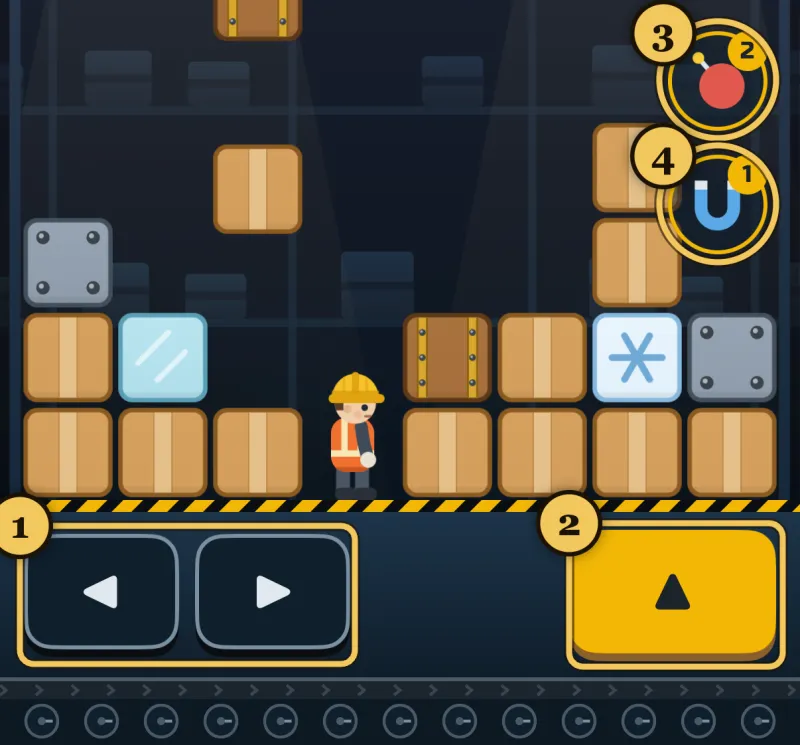
The rules do not change with the screen, so everything on the how to play page applies. What a bigger screen gives you is a calmer view of the crane’s route and of the whole bottom row, which is the thing you are always watching.
It plays offline, with no Wi-Fi needed, and the game is saved whenever you pause or leave. Watching a reward ad, the shop and the leaderboards need a connection.
Two hands and easy reading
A tablet is where two-handed play becomes comfortable. On a phone, a thumb on each side covers the screen; on an iPad resting on a table you can use several fingers, and games that ask for a quick tap on one side and a steady hold on the other become practical. That is why puzzle games with a field to study, builders and drawing games feel natural here, while a game made for a single thumb can feel oddly empty.
Reading matters too. Small text that is a squint on a phone is easy on a tablet, which helps in games with long descriptions, rules screens and menus. If a game puts a lot of information on the screen, a bigger display means fewer taps to get to it.
A shared tablet
An iPad is often a shared device, and that changes what “best” means. If other people use it, look for games that save quietly, that do not start purchases with one tap, and that let you switch off sound. Purchases go through the usual confirmation of your account, including a parent’s approval where an account uses it. A game that works offline is also a safer thing to hand over on a trip, because nobody can wander into a store page by accident.
Playing on a stand
If you play on a stand, a few small things help. Put the tablet at a slight angle so you can reach both ends of the controls. Lower the brightness in a dark room, which suits a game set at night. And take the same breaks you would with a phone, because a bigger screen does not make long sessions easier on your eyes.
How to pick
- Decide how long you will play: a few minutes, or a whole evening.
- Choose a kind of game that gains from space.
- Check the page for iPad support and tablet screenshots.
- Check what needs a connection.
- Read what is sold inside the game before you start.
For phones the same questions apply, and there is a separate list of puzzle games for iPhone. If you travel with the tablet, offline games covers what works without a signal.
Do phone games work on an iPad?
Many do, but some are only stretched to fit. A game that lists iPad support usually looks and feels better.
Can I play iPad games without Wi-Fi?
Many can. Look for games that say they work offline, and remember that ads, purchases and leaderboards still need a connection.