The best puzzle games for iPhone are not one list but five kinds, and the right kind depends on what you want from the next ten minutes: quiet thinking, quick reflexes or a bit of both. Below, each kind in plain words, what it asks of a thumb on glass, and a short checklist you can run on any game before you commit to it.
Five kinds of puzzle game, and what they ask of you
Almost every puzzle on a phone belongs to one of five families. Knowing the family tells you more than a screenshot does, because the family decides how much you think, how much you tap and whether a bad game feels like your fault or the game's.
Sliding and placing: you decide, nothing moves until you do
In these games you drag a piece to a spot and the game waits. There is no clock pushing you, so the skill is planning: where will this shape fit, and what will it block later? A drag on a touchscreen is precise enough that mistakes feel like misjudgements, not misfires. It suits a sofa or a queue, and it suits anyone who dislikes being rushed.
Logic and deduction: numbers, grids and rules
Number grids, hidden-object logic, path puzzles and grid-fill puzzles are all turn-free thinking. You often write nothing down, but you do hold several possibilities in your head at once. A single level can take one minute or twenty. The thumb work is light: a tap to mark a cell, a tap to undo.
Word puzzles: vocabulary, not spatial thinking
Word games use a different muscle and are the easiest to play in short bursts. They are included here because many people say puzzle when they mean a word grid; if that is you, you can skip the rest of the shapes and look for a daily grid with a clear reset time.
Physics puzzles: aim, release, watch
You launch, cut or drop something and the physics decides. The thinking is real, but the result has a random flavour: the same move may fail by a pixel. A drag and release gesture is the whole control scheme, which is why these feel natural on a phone.
Action puzzles: thinking while things move
The last family adds time. Pieces fall, a conveyor runs or enemies move, and you have to plan and act in the same second. These ask the most of your thumbs, because you need to move, jump or turn at a precise moment, and the game usually puts virtual buttons on screen. They are also the most replayable, since every run differs.
| Kind | What it asks of you | Your thumbs do | Best when |
|---|---|---|---|
| Sliding and placing | Planning without a clock | Drag and drop | You want calm |
| Logic and deduction | Holding several options in mind | Tap and undo | You have a quiet ten minutes |
| Word | Vocabulary and pattern spotting | Tap letters | You have two minutes |
| Physics | Aim and a little luck | Drag and release | You want a light challenge |
| Action puzzle | Planning and timing together | Buttons or swipes under time pressure | You want to feel busy |
A checklist before you commit to one
Whatever the family, the same handful of questions separates a game you will keep from one you will delete in a day. You can answer most of them from the product page, and the rest in your first five minutes.
- Read the controls first. Are there on-screen buttons, and are they big enough that your thumbs do not cover the action? A game that hides the playing field under your own hand is a bad fit for a small phone.
- Find out how a session ends. A good puzzle has a clear end: a level done, a shift signed off, a game over. A game that never ends and only asks you to keep tapping is a different product.
- Check what a loss costs. Does a failed attempt send you back a few seconds or half an hour? Check whether the game lets you carry on, and what that costs in time, an ad or money.
- Look at how ads work. Some games interrupt you after every round; others show a video only when you choose to. The difference matters more than the word free.
- Test it offline. Put the phone in airplane mode and start a level. A game that needs a connection to play at all is poor company on a train or a plane.
- Ask what stays fresh. A set of fixed levels runs out; a game with a daily challenge or rising difficulty does not. Neither is better, but you should know which you are buying into.
An action puzzle as one example
Night Shift is an action puzzle, so it sits in the last family above, and it is worth looking at as an example of how the checklist plays out. A crane at the top of the screen drops crates into eight columns. You walk, jump and push the crates so that every column holds at least one; when that happens the bottom row ships out for points and everything above sinks one row. The game ends if a column reaches ten crates, or a crate lands on you after your helmet is gone. The full rules are in how to play.
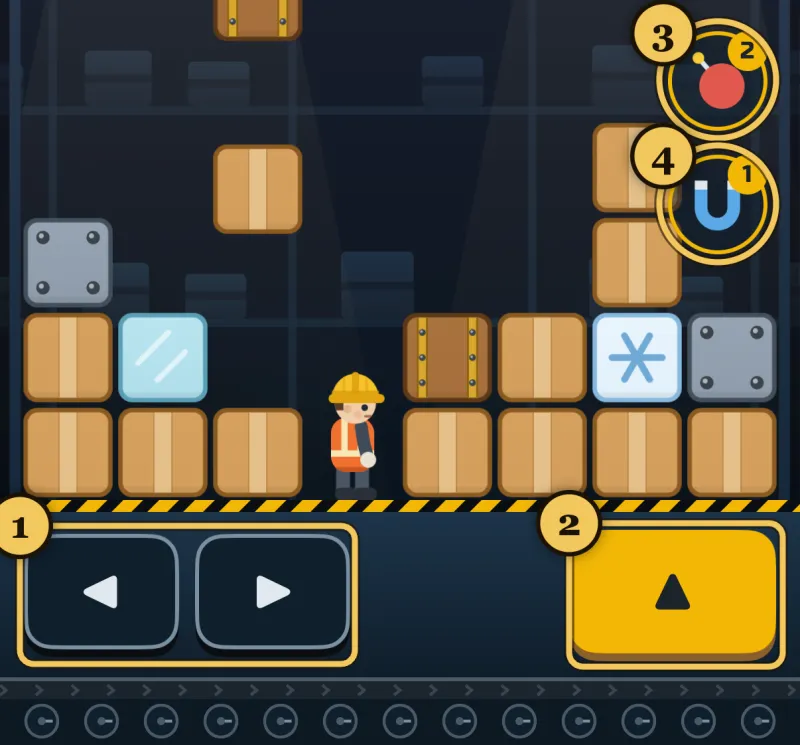
Run it through the checklist. Controls: arrows, a jump key, and two item keys, all under the field. Session end: a clear game over, and every shift of eight or more rows is a natural stopping point. A loss: you can continue with a fresh helmet by spending a coin or watching a short ad, and you may skip both. Ads: only the ones you choose to watch, with no banners and nothing between games. Offline: it plays with no connection; only ads, purchases and leaderboards need one. What stays fresh: shifts that get faster, plus a daily challenge with the same crates for everyone. It is available on iPhone, iPad and Android.
Choosing between thinking and reflexes
If you finish a long day and want your brain to idle, choose a placing or logic puzzle. If you want to stop thinking about your day altogether, an action puzzle works better, because it leaves no room for the day to come back. Many people end up with one of each: a calm game for the evening and a fast one for a gap of five minutes.
A practical test is to ask what you do with a bad round. If you shrug and press play again, you want an action puzzle. If you feel the urge to take the round back and think it through, you want a planning game.
Questions people ask
Should I pay for a puzzle game or play a free one?
Either can be good. What matters is what free costs: look for optional ads you choose to watch and purchases that are not needed to progress, and avoid games that block you with a timer or a paywall.
How many puzzle games should I keep installed?
Two is plenty: one slow, one fast. More than that and you spend the free minutes choosing instead of playing.
Keep reading: tips and strategy; offline games.